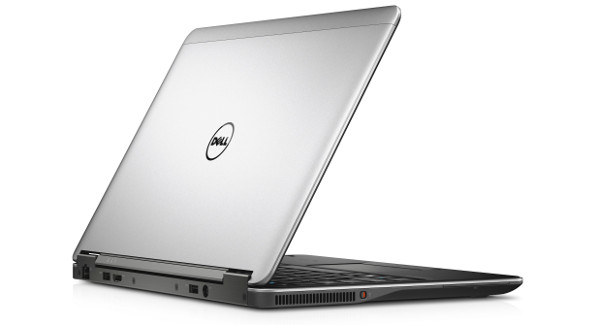
The appearance of the Dell Latitude E7240 may not be as striking as some 'blingy' consumer ultrabooks, but it is certainly a step forward compared to business laptops from not so long ago. The device is initially compact and clearly designed for use on the go. The 12-inch screen and small casing scream 'take me with you!'. However, the weight of 1.35 kilograms is relatively heavy for an ultrabook of this size. The design is rather unremarkable, and in this case, that is not necessarily a bad thing. The back is silver-colored and shows a modest Dell logo. The wrist rest under the keyboard has a soft finish that feels comfortable. The casing is generally quite sturdy, although it shows some unwanted flex around the keyboard. So it's not a true 'hardbody', but the machine should certainly withstand a bump, partly thanks to the powder coating on the underside. Bells and whistles have been kept to a minimum; Dell has only placed a fingerprint reader below and some volume buttons above the keyboard. The latter are a bit cramped, and adjusting the volume can be somewhat fiddly.
The keyboard itself is not of the popular chiclet type. Personally, I find that a bit disappointing; I tend to make fewer typing mistakes when there is a bit of space left between the keys. Nevertheless, the keyboard feels anything but bad, especially thanks to the clear key travel. Unfortunately, the somewhat unstable base causes the board to flex a bit, which is particularly noticeable when you type with a firmer touch. A separate numeric section is missing, and it takes some getting used to that the Fn keys for screen brightness are attached to the up and down arrow keys. Once accustomed, however, it feels logical and intuitive. Frequently used keys like Backspace, Shift, and Enter are nicely spacious. The trackpad works fine and has nice clear physical buttons, although you can also click on the surface of the mouse itself.
Performance
You don't have to shy away from horsepower with this machine in this configuration. The Haswell Core i5 4300U processor at 1.9 GHz and 128 GB SSD form a smooth tandem on which you can run almost all average business applications effortlessly. The 8 GB of RAM is also sufficiently ample. Unfortunately, you cannot opt for a regular hard drive if you want more storage capacity. The size of the SSD is also not very generous; we expected at least double the storage capacity. Don't expect graphical marvels; the machine runs on an onboard Intel chip in that regard. Fine for 3D effects in Windows, unsuitable for games or other graphically intensive 3D rendering.
Connections and Extras
Dell has arranged the connectivity on the device very neatly. A large part of all physical connections is located at the back of the machine, which reduces cable clutter. You will find two USB 3.0 ports, an Ethernet port, a power port, and an HDMI connection at the back. On the right side, you also get a DisplayPort, an SD card reader, and an extra USB port. If that's still not enough, you can use a docking station. A connection for that is located at the bottom of the device. Dell also uses the left side; there you will find a smart card slot and - notably - a physical Wi-Fi switch. You don't see that often these days, but I find it handy: it prevents your battery from being drained by an unnecessary open Wi-Fi signal. Video calling is possible thanks to an integrated 720p webcam. Notably, there is an NFC chip under the casing of the wrist rest. One possible application is quick payment while shopping online by holding your credit card against it. Of course, the relevant webshop must support this, and your credit card must be equipped with an NFC chip.
WiDi
Another extra is the WiDi option, short for Wireless Display. This Intel technology allows you to stream video wirelessly to a compatible device. Handy for presentations, for example.
Display
As mentioned, the device has a 12.5-inch display. Whether you find it a disaster or not, it is clear that Dell has tried to cut costs here. The resolution is a not-so-impressive 1366 x 768, although I must immediately add that on a 12-inch surface, the pixels are somewhat less noticeable than when you go (much) larger. Still, it's a shame in an age where every tablet costing a few hundred euros already comes with a full HD display or better. Also, the panel type, a TN panel without touch functionality, does not create a 'wow' factor. The color reproduction and viewing angles lag behind what you are used to on a modern ultrabook with an IPS panel. Especially the contrast is simply low, to the point of being poor. It's not a crucial loss on a business device, but if you expect more from your display, you can fortunately also equip this model with a full HD IPS panel with touch functionality. You also get a carbon fiber casing and Gorilla Glass protective layer with that, certainly not an unattractive option. Unfortunately, we could not test that configuration.
Security
A Latitude wouldn't be a Latitude if it weren't packed with business security and management features. For corporate environments, a vPro chip is, for example, a kind of minimum requirement, and the laptop provides that. It ensures that the IT department can perform tasks such as BIOS updates and inventory remotely via the network. It also allows for remote wiping of the hard drive. Additionally, a TPM chip is present for hardware-encrypted storage of your login credentials.
Dell delivers the machine with Dell Data Protection | Encryption. With this solution, you can enforce encryption of all existing business data, both on the machine itself and in Dell's cloud. For access, the previously mentioned smart card slot and fingerprint scanner are ready. A nice set of security features, something that clearly distinguishes the device from the large bulk of consumer ultrabooks.
Windows 7
This ultrabook comes out of the box preconfigured with Windows 7 Professional. That is currently a good choice for many companies. If you are already on Windows 8, no problem: Dell simply provides the DVD and the necessary license for this.
Battery
The Latitude E7240 is primarily made for mobility. You would expect a battery life that matches that. In that respect, the laptop is somewhat disappointing. If you don't do anything too crazy, you can work for about five to 5.5 hours in a row. We've definitely seen better. The Sony Vaio Pro 13, the Macbook Air, the Samsung ATIV Book 9 Plus: all of them achieve more than seven hours without a plug. The small casing clearly plays a role here; there simply isn't room for a larger battery. Not a dealbreaker, but definitely a factor to consider.